
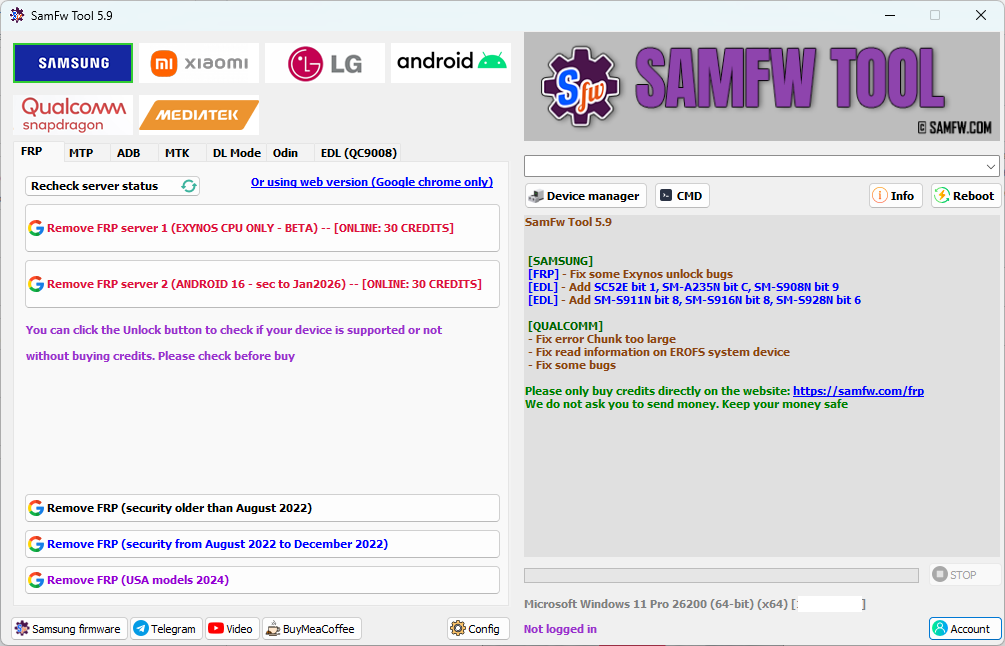
SamFw FRP Tool V5.9 is out and if you’ve been using V5.8 for Samsung Exynos FRP bypass there’s a specific reason to update immediately. V5.9 fixes Exynos unlock bugs that were causing failures on certain Samsung models, adds six new EDL firehose devices including SC52E, SM-A235N, SM-S908N, SM-S911N, SM-S916N and SM-S928N, and fixes two Qualcomm specific errors that were blocking repairs on certain devices. It’s a targeted bug fix and device expansion update rather than a feature overhaul, which is exactly what the tool needed after V5.8’s larger changes.
This guide covers the complete V5.9 update including every changelog item explained in plain language, the full version history from V5.0 through V5.9, what changed in each version, the complete features list, step by step FRP bypass guide for both Qualcomm and Exynos Samsung devices, and every error you might encounter with the fix for each one.
The official download link and verified MD5 checksum are at the bottom of this page.
⚠️ Disclaimer
The tools and methods on this page are for educational and informational purposes only. Only use them on devices you personally own or have been given explicit permission to work on. Bypassing FRP on a device you don’t own is illegal and can result in serious legal consequences. Always comply with Google’s terms of service and Samsung’s device policies. Rise ROM does not support any unauthorized or illegal use of the tools shared here.
What’s New in SamFw FRP Tool V5.9 – Full Changelog Explained
SamFw Tool 5.9 fixes some Exynos unlock bugs, adds new EDL firehose devices and fixes Qualcomm errors. Here’s every change in V5.9 broken down clearly:
Samsung FRP – Exynos Unlock Bug Fixes V5.8 introduced improved Exynos stability but certain Exynos Samsung models were still experiencing unlock failures during the FRP process. V5.9 addresses these specific bugs. If your Samsung Exynos device was failing at the FRP removal step in V5.8 this update is the primary reason to move to V5.9 immediately. The exact models affected aren’t listed publicly but based on community reports the Korean market Samsung variants were among the most affected which explains why several of the new EDL additions are N suffix Korean models.
Samsung EDL – Six New Firehose Devices Added V5.9 adds SC52E bit 1, SM-A235N bit C, SM-S908N bit 9, SM-S911N bit 8, SM-S916N bit 8 and SM-S928N bit 6. Breaking these down:
SC52E is a Spreadtrum based chipset model. SM-A235N is the Samsung Galaxy A23 Korean variant. SM-S908N is the Samsung Galaxy S22 Ultra Korean variant. SM-S911N is the Samsung Galaxy S23 Korean variant. SM-S916N is the Samsung Galaxy S23 Plus Korean variant. SM-S928N is the Samsung Galaxy S24 Plus Korean variant.
The N suffix in Samsung model numbers indicates Korean carrier variants. These are among the highest security patch level Samsung devices in circulation because Korean carrier software receives updates extremely quickly. Adding EDL firehose support for these specific bit versions means Korean market Samsung devices that previously required paid box tools can now be processed through SamFw’s EDL functions.
Qualcomm – Chunk Too Large Error Fixed V5.9 fixes the error Chunk too large on Qualcomm devices. This error was appearing during EDL operations on certain Qualcomm Samsung devices when the data being transferred exceeded the buffer size the tool was allocating. It caused the operation to fail partway through with no clear indication of why. This is now resolved.
Qualcomm – EROFS System Device Read Fix V5.9 fixes read information on EROFS system devices. EROFS is a read-only compressed file system that newer Samsung Qualcomm devices use. When the tool tried to read device information on EROFS based firmware it was returning incomplete or incorrect data. This is corrected in V5.9, which means accurate device information display on newer Samsung Qualcomm models.
Complete Version History – V5.0 to V5.9
Understanding every version helps you troubleshoot and helps you decide which version works best for a specific device if V5.9 has unexpected behavior on an older model.
SamFw Tool V5.0 Added Android 16 FRP server support for the first time. Added battery cycle reading for OneUI 8 and above devices. Fixed Windows 7 compatibility errors.
SamFw Tool V5.1 Optimized Android 16 FRP removal. Optimized FRP USA 2024 model handling. Performance improvements on the server connection side.
SamFw Tool V5.2 Further Android 16 FRP optimization. Fixed the samfw.comapi error when changing serial numbers. Added FRP 2024 USA model unlock for models ending in U1. Added dual ASOH and BSOH battery information display. Fixed X509 certificate errors. Added serial number display in port information.
SamFw Tool V5.3 Fixed the FRP 2022 bug that was causing an infinite loop on certain devices. Added Bit display when reading device information. Added ADB block CSC change when SIM is swapped. Added open network settings function. Optimized ADB read information.
SamFw Tool V5.4 Added full Samsung EDL 9008 support including read info, factory reset, reset FRP and serial number display. Added specific model support for SM-F926B, SM-F926N, SM-F926U, SM-G780G, SM-G990B, SM-G991U, SM-G998U, SM-N986U, SM-T736B, SM-T978U and SM-X210. Added unblock CSC change when SIM is swapped.
SamFw Tool V5.5 Added Samsung Exynos FRP Beta support for the first time, opening Exynos market Samsung devices to SamFw. Fixed wrong serial number display in Samsung Download mode.
SamFw Tool V5.6 Optimized Exynos unlock with auto-accept USB debugging, removing the manual step that was causing failures. Fixed reboot Download mode on older devices. Added ten new EDL models including SM-A057G, SM-A057F, SM-E145F, SM-F946B, SM-G990B, SM-G990U, SM-S921U, SM-S928B, SM-S918B and SM-T630. Fixed MediaTek stuck load module issue.
SamFw Tool V5.7 Further Exynos unlock optimization and small error fixes. Added sixteen new EDL models including SM-A736B, SM-F731N, SM-F741U, SM-F936B, SM-F946U, SM-F956U, SM-G990U2, SM-G9910, SM-S901U, SM-S906U, SM-S908E, SM-S908U, SM-S926U, SM-S928U, SM-T737 and SM-X218U.
SamFw Tool V5.8 Fixed FRP status reading on Android 15 and below. Added Visual C++ automated checking for Exynos operations. Fixed Android 16 always returning unsupported error on Exynos devices. Fixed random crash bugs on some PC configurations.
SamFw Tool V5.9 Fixed Exynos unlock bugs. Added SC52E bit 1, SM-A235N bit C, SM-S908N bit 9, SM-S911N bit 8, SM-S916N bit 8 and SM-S928N bit 6 via EDL. Fixed Chunk too large error on Qualcomm. Fixed read information on EROFS system devices. General bug fixes.
Free vs Paid – What V5.9 Changes
The free versus paid structure in SamFw FRP Tool V5.9 remains the same as previous versions. Here’s the honest breakdown:
Completely free in V5.9: Samsung Qualcomm FRP removal on devices with security patches before December 2022. This covers a large volume of Galaxy A, M and J series devices still in active repair circulation. No account required, no credits, no internet connection needed for the bypass operation itself.
Requires paid credits in V5.9: Samsung Qualcomm FRP removal on devices with patches from December 2022 onwards. All Samsung Exynos FRP removal regardless of patch date. The new Korean variant EDL operations (SM-A235N, SM-S908N, SM-S911N, SM-S916N, SM-S928N) are also in the paid EDL tier.
Is the Exynos fix in V5.9 worth the credits? Yes for repair shops in Exynos markets. The Exynos bug fixes in V5.9 directly improve the success rate that V5.8 was already delivering. If Exynos operations were failing on your specific Samsung model in V5.8 they have a better chance of succeeding in V5.9 with the same credit cost.
Full Features of SamFw FRP Tool V5.9
SamFw Tool V5.9 supports Samsung, Xiaomi, LG, Qualcomm and MediaTek devices with the following functions:
Samsung FRP: Remove FRP standard, Remove FRP new security, Remove FRP 2024 USA models including U1 variants, Remove FRP Android 16, Exynos FRP removal (paid credits), Block CSC change when SIM is swapped.
Samsung MTP Mode: Factory reset in Test mode, Disable Knox in Test mode, Disable Factory mode, KG Unlock (Untested), Standard factory reset, Enable secret code for Verizon devices.
Samsung ADB Mode: Change CSC, Change serial number (Beta), Remove Samsung account (Settings only, not locked state), Enable mobile data toggle for AT&T phones, Change CSC root mode.
Samsung Download Mode: Exit Download mode, Soft brick fix, FRP Android 5 and 6 on supported models.
Odin Flash: Save recent flash files, Auto detect file and slot, Auto extract ZIP files, Ignore MD5 checksum.
Misc: Driver signature enforcement status check, Disable and enable driver signature enforcement, Install Samsung USB driver, Install VC++ 2015, Automated Visual C++ detection for Exynos, Auto write log to file.
Xiaomi: Bypass Micloud Android 8.1 via ADB, Enable Diag Root, Fastboot FRP removal on unlocked devices, Sideload factory reset and FRP removal, Qualcomm Micloud anti-relock bypass, Read offline Micloud information, EDL 9008 factory reset, FRP reset and Micloud reset.
LG: Factory reset via MTP, EDL factory reset and FRP removal supporting G5, G6, G7, G8, G8X, G8S, V30, V40, V50, V50S, Q6, V20, V35, V60, Flash LG KDZ via LG UP.
General Android ADB: Battery information with ASOH and BSOH, Disable and enable OTA updates, Set language, Factory reset, Hide developer options, Open network settings, Open browser during FRP, Remove FRP via ADB, Application manager with install, disable, clear data and bloatware removal functions, Remove screen lock on rooted devices.
Qualcomm EDL 9008: Partition manager read, write and erase, Reset FRP, Factory reset, Erase userdata.
MediaTek: Factory reset, Format userdata, Remove FRP, Unlock bootloader, Relock bootloader, Bypass auth.
Supported Samsung Models in V5.9
Qualcomm Samsung – Free Tier (Pre December 2022 Patch)
| Series | Android Version | Notes |
|---|---|---|
| Galaxy A Series (2019 to 2021) | Android 9 to 12 | High success rate |
| Galaxy M Series (older) | Android 10 to 11 | Solid support |
| Galaxy J Series | Android 8 to 11 | Most models covered |
| Galaxy S Series (older Qualcomm) | Android 10 to 12 | Mid range models |
Qualcomm Samsung – Paid Tier (Post December 2022 Patch)
| Series | Android Version | Notes |
|---|---|---|
| Galaxy A Series (2022 to 2025) | Android 12 to 16 | Credits required |
| Galaxy S Series (USA Qualcomm) | Android 12 to 16 | Including U1 variants |
| Galaxy Z Fold and Flip (USA) | Android 12 to 16 | Credits required |
| Galaxy Tab (Qualcomm) | Android 10 to 16 | Selected models |
New EDL Models Added in V5.9
| Model | Device | Market | Bit Version |
|---|---|---|---|
| SC52E | Spreadtrum based device | Various | Bit 1 |
| SM-A235N | Galaxy A23 | South Korea | Bit C |
| SM-S908N | Galaxy S22 Ultra | South Korea | Bit 9 |
| SM-S911N | Galaxy S23 | South Korea | Bit 8 |
| SM-S916N | Galaxy S23 Plus | South Korea | Bit 8 |
| SM-S928N | Galaxy S24 Plus | South Korea | Bit 6 |
Exynos Samsung – Paid Tier Only
| Series | Region | Android Version |
|---|---|---|
| Galaxy S Series (Exynos) | Europe, Middle East, Africa | Android 12 to 16 |
| Galaxy A Series (Exynos) | Europe, Asia | Android 11 to 15 |
| Galaxy M Series (Exynos) | Asia, Middle East | Android 11 to 14 |
| Galaxy Tab (Exynos) | Global Exynos variants | Android 11 to 15 |
What You Need Before Starting
A Windows PC running Windows 7, 8, 10 or 11. Windows 10 or 11 recommended for best compatibility. No Mac or Linux support.
Samsung USB drivers. Install from the Misc tab inside the tool or from our drivers page. Restart your PC after installation.
Microsoft Visual C++ 2015 or above. V5.9 continues the automated checking from V5.8. Install from Microsoft’s official site if prompted.
A USB data cable that supports data transfer. Not a charging cable. Replace this first when troubleshooting detection issues.
A SamFw account with credits for paid operations. Create free at samfw.com. Check balance before starting since credits are non-refundable if operations fail due to user error.
Wi-Fi on the locked Samsung device. Required for Exynos FRP operations. Connect on the setup screen before plugging in the USB cable.
Device charged to at least 30%. FRP operations involve restarts. A dead battery mid-process requires starting over.
Antivirus temporarily disabled. The application uses several tools and scripts to unlock the device as well as an obfuscator to protect the source code, so it may be mistakenly suspected of being a virus. This is a false positive. Leading antivirus software such as Kaspersky, Avast, Avira and AVG trust the application and mark it as safe.
Download SamFw FRP Tool V5.9
The official download is available directly from samfw.com. Always verify the MD5 checksum after downloading to confirm the file is clean and unmodified.
| Version | What’s New | Download | MD5 |
|---|---|---|---|
| V5.9 (Latest) | Exynos bug fixes, 6 new EDL models, Qualcomm fixes | Download | 95be51dcd2e2bb2ec73671664c27fcc0 |
| V5.8 | Android 16 Exynos fix, Visual C++ check, crash fix | Download | Available on download page |
| V5.6 | Exynos auto USB debugging, 10 new EDL models | Download | Available on download page |
| V5.4 | Samsung EDL 9008 added, multiple new models | Download | Available on download page |
To verify the MD5 checksum after downloading open PowerShell and run:
Get-FileHash SamFwToolSetup_v5.9.zip -Algorithm MD5
Compare the output with 95be51dcd2e2bb2ec73671664c27fcc0. If they match the file is genuine and unmodified.
How to Install and Set Up
Step 1: Verify the download Run the MD5 check as shown above before extracting anything. This takes 10 seconds and confirms you have the genuine file.
Step 2: Extract the archive Right click the ZIP file and select Extract Here using WinRAR or 7-Zip. Extract to your desktop or C drive. Never run from inside the ZIP.
Step 3: Disable antivirus Disable your antivirus or add the extracted folder to exclusions before opening it. Some antivirus programs delete files during extraction.
Step 4: Run as administrator Right click SamFw Tool.exe and select Run as Administrator every time. Never double click to open.
Step 5: Install Samsung drivers Navigate to the Misc tab and click Install Samsung USB Driver. Restart your PC after.
Step 6: Install Visual C++ if prompted If the tool shows a Visual C++ warning click Install VC++ 2015 in the Misc tab.
Step 7: Log in Click Login and enter your SamFw account credentials. Credit balance shows in the dashboard. For free operations on older patch Qualcomm Samsung no login is needed.
Step by Step FRP Bypass Guide
Qualcomm Samsung FRP Bypass
Step 1: Open SamFw FRP Tool V5.9 as administrator. Confirm the device is detected showing model number and patch date.
Step 2: On the locked Samsung tap Emergency Call. Type *#0*# on the dialer. Leave the test mode screen open without tapping anything on it.
Step 3: Click Enable ADB in the tool. Wait for confirmation. Takes 10 to 30 seconds.
Step 4: Click Remove FRP. Watch the progress log. Takes 1 to 3 minutes. Do not disconnect during this process.
Step 5: When success message appears disconnect the USB cable. Hold power until Samsung fully shuts down. Count 10 seconds. Power on manually.
Step 6: Complete normal Samsung setup. Google verification screen should be gone.
Exynos Samsung FRP Bypass
Step 1: Open SamFw FRP Tool V5.9 as administrator. Log in and confirm sufficient credit balance.
Step 2: Connect locked Samsung Exynos to Wi-Fi on the setup screen.
Step 3: Connect Samsung to PC via USB. Confirm Exynos shows in chipset field.
Step 4: Navigate to the Exynos FRP section. Click Remove FRP Exynos.
Step 5: V5.9 includes the auto-accept USB debugging from V5.6. The device handles the debugging prompt automatically in most cases. If a prompt appears on the Samsung screen tap Accept quickly.
Step 6: Wait for completion. Takes 2 to 5 minutes. Progress shows in tool log.
Step 7: Cold restart Samsung. Hold power until fully off, wait 10 seconds, power on manually.
Step 8: Complete normal Samsung setup.
Errors and Fixes
Device not detected after connecting Install Samsung USB drivers through the Misc tab. Restart PC after installation. Check you’re using a data cable not charging only. Run tool as administrator. Try USB 2.0 port instead of 3.0.
Exynos unlock still failing after updating to V5.9 V5.9 fixed specific Exynos bugs but not all Exynos models are equally supported. Confirm your Samsung is a supported Exynos variant. Check credit balance is sufficient. Ensure Wi-Fi is active on the device. If failures continue try ZeroKnox Removal Tool which handles some Exynos models through a different method.
Chunk too large error on Qualcomm This was specifically fixed in V5.9. Update to V5.9 if you’re on an earlier version. If it persists on V5.9 try a different USB cable and USB 2.0 port.
EROFS device showing incorrect information Fixed in V5.9. Update from earlier versions. If device info still shows incorrectly after updating try disconnecting and reconnecting while the tool is open.
Visual C++ error on launch Click Install VC++ 2015 in Misc tab. If that fails download directly from Microsoft’s official site and install manually before reopening the tool.
Test mode code not working Try #0# without the asterisk. If neither works your firmware version has patched this entry point. Try ZeroKnox Removal Tool’s three ADB enable methods as alternatives.
FRP removal completes but verification screen still appears Full cold restart: hold power until completely off, 10 seconds, power on manually. If screen persists run Remove FRP a second time. Some Samsung models need two passes.
Credits deducted but operation failed Save the auto-generated log file (added in V4.9). Contact SamFw support through your account portal with the log file. Credits are typically refunded for server-verified failures.
Antivirus blocking or deleting the tool Add the SamFw folder to antivirus exclusions before extracting. Run the MD5 check to confirm your download is genuine. Leading antivirus software such as Kaspersky, Avast, Avira and AVG trust the application and mark it as safe.
SamFw V5.9 vs Other Free Samsung FRP Tools
| Tool | Exynos Support | Android 16 | Credits | Korean Models | Success Rate |
|---|---|---|---|---|---|
| SamFw FRP Tool V5.9 | Yes (paid) | Yes | Free up to Dec 2022 | Yes (new in V5.9) | Very High |
| ZeroKnox Removal 2.4 | No | Yes | Free | Limited | High |
| Prime Tool X V9.0 | No | Yes | Free | No | Good |
| HalabTech FRP Tool | No | Yes | Free | No | Good pre-Jan 2026 |
| King Tool | No | No | Free | No | Medium |
The Korean model column tells the story for V5.9. SM-S908N, SM-S911N, SM-S916N and SM-S928N are all Korean market Samsung devices that no other free tool currently covers through EDL. For repair shops handling Korean Samsung devices this is a unique advantage.
FAQ
What exactly did V5.9 fix in Exynos unlock?
The changelog says it fixed some Exynos unlock bugs without specifying exact models. Based on community reports Korean variant Samsung Exynos models were most affected by the bugs in V5.8. V5.9 specifically targeted these failures. If your Exynos Samsung was failing in V5.8 try V5.9.
Do I need to pay for the new Korean model EDL operations?
Yes. EDL operations on Samsung devices are in the paid credits tier. The new Korean models added in V5.9 require credits the same as other Samsung EDL operations.
What is the Chunk too large error that V5.9 fixed?
It was a Qualcomm EDL operation error where the data transfer buffer was exceeded during certain operations on specific Samsung Qualcomm models. It caused operations to fail partway through. V5.9 fixed the buffer handling to prevent this.
Should I update from V5.8 to V5.9 immediately?
Yes if you do Samsung Exynos FRP bypass or EDL operations on Qualcomm Samsung devices. V5.9 fixes real bugs that were causing failures. The update is free and the install replaces V5.8 cleanly.
Is the MD5 checksum important?
Yes. Always verify it before installing any repair tool. The V5.9 checksum is 95be51dcd2e2bb2ec73671664c27fcc0. If your downloaded file produces a different checksum it’s been modified. Download again from the official link.
Does V5.9 work on Samsung Android 16?
Yes. Android 16 FRP support was added in V5.0 and has been optimized through each subsequent version. V5.8 fixed the Android 16 always returning unsupported error and V5.9 builds on that stability.
Related Tools
ZeroKnox Removal Tool handles Samsung FRP and Knox Guard removal on Android 8 through 16 completely free. Use it when SamFw requires credits and your device is within ZeroKnox’s supported range.
Prime Tool X is the most beginner friendly free Samsung tool for budget A and M series devices on Android 12 through 16 with no credits required.
HalabTech FRP Tool covers Samsung Android 15 and 16 through MTP mode on devices with firmware before January 2026.
Samsung FRP Tools is our complete comparison of every major free Samsung FRP tool in 2026 with honest success rates by Android version.
USB Drivers has Samsung USB drivers alongside all other chipset drivers your repair tools need.
OTA Firmware is where to go if your Samsung needs a firmware flash before or after FRP removal.