
SamFirm AIO
SamFirm AIO v3.3 by Mahmoud Salah, the latest version of which is v3.3, is an all-in-one tool primarily designed for bypassing the FRP lock on Samsung devices. What makes it different from most FRP tools is the combination it offers in a single package. Firmware download directly from Samsung servers, MTP mode FRP bypass, CSC change, Knox disable, MTK auth bypass and a collection of helper tools, all in one place without needing separate downloads for each function. This guide covers everything about SamFirm AIO v3.3, what it does, what each function is for, how to use it for both FRP bypass and firmware download, and when to use the older v1.6.4 instead.
All download links are at the bottom of this page.
⚠️ Disclaimer
The tools and methods on this page are for educational and informational purposes only. Only use them on devices you personally own or have been given explicit permission to work on. Bypassing FRP on a device you don’t own is illegal and can result in serious legal consequences. Always comply with Google’s terms of service and Samsung’s device policies. Rise ROM does not support any unauthorized or illegal use of the tools shared here.
SamFirm AIO vs SamFirm Reborn – What’s the Difference
There are two completely different tools sharing the SamFirm name in 2026 and most guides treat them as the same thing. They aren’t.
SamFirm AIO v3.3 (Mahmoud Salah / AcaSilver) This is what most people mean when they search SamFirm AIO v3.3. It’s a Windows application that bundles Samsung firmware downloading alongside FRP bypass tools, CSC change, Knox disable and a collection of Samsung utility functions. The latest SamFirm AIO Tool enables you to download Samsung flash files, MTK auth bypass, open YouTube and Maps, open Galaxy Store to download GS Settings, access Smart Switch, set Samsung Pass, open Settings, Samsung My Files and File Commander remotely. The file size is 690MB because of everything bundled inside. This is the version this guide focuses on.
SamFirm Reborn 0.3.6.9 (ivanmeler, July 2026) This is the modern open-source pure firmware downloader. No FRP bypass, no helper tools, just clean Samsung firmware downloading with fixed server protocols for 2026. If your only need is downloading Samsung firmware and you don’t need FRP bypass functions, SamFirm Reborn is a lighter and more regularly maintained option. We mention it at the end for reference.
Which one should you use: If you need FRP bypass alongside firmware downloading, use SamFirm AIO v3.3. If you only need to download Samsung firmware for Odin flashing, SamFirm Reborn 0.3.6.9 is cleaner and more current on server protocols.
What’s in the SamFirm AIO Package
SamFirm also known as SamFirm AIO, SamFirmware or SamFirm_A.I.O is a free portable Windows application for downloading official Samsung firmware directly from Samsung’s own servers. Instead of hunting for stock ROM files across shady forums, SamFirm pulls the exact PDA, CSC and binary version your device needs straight from Samsung’s update infrastructure.
Here is everything bundled inside the 690MB SamFirm AIO v3.3 package:
Core Functions: Official Samsung firmware downloader pulling files directly from Samsung servers. MTP mode FRP bypass for Samsung devices. One-Click Reset FRP in Normal Mode. CSC change function. Knox disable. Disable Factory mode.
Helper Tools Included: MTK Auth Bypass, Open YouTube, Open Maps, Open Galaxy Store, GS Settings download, Smart Switch access, Samsung Pass setup, open Settings, Samsung My Files access, File Commander remote access.
Drivers Bundle: Download All Odin3 and Samsung USB Drivers across all versions. The package includes Samsung USB drivers so you don’t need to source them separately.
Apple Firmware (Unexpected): SamFirm AIO v3.3 also includes Apple firmware download capability. This is rarely mentioned in any guide. It’s a minor function and the primary audience is Samsung repair technicians but it’s worth knowing the package covers it.
Flash Firmware Function: The latest SamFirm Tool can flash custom ROM along with official firmware download, offering more flexibility for users looking to customize their devices.
Version History – v1.0 to v3.3
Understanding the version progression helps you choose which one to use for specific devices.
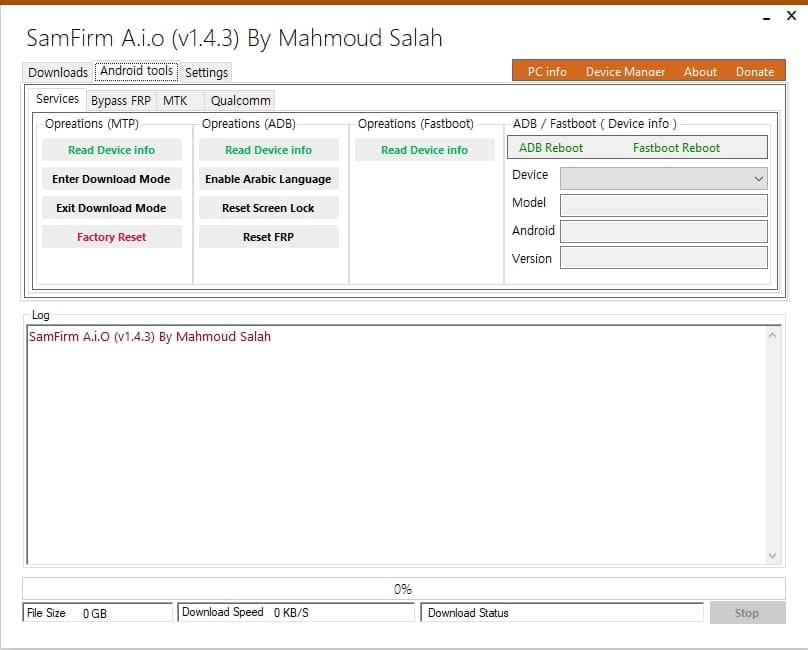
SamFirm AIO v1.0 to v1.4.3 The original versions focused primarily on Samsung firmware downloading and basic FRP bypass. Early changelog included download all Odin3 and Samsung USB drivers, check and download latest Samsung firmware files. These older versions still circulate on many sites but have limited Samsung model coverage for post-2022 devices.
SamFirm AIO v1.6.4 SamFirm AIO v1.6.4 is the latest multi-platform release. Unlike v1.4.3 which focused mainly on Samsung firmware and FRP bypass, v1.6.4 expanded support to multiple Android platforms beyond Samsung. Some repair shops prefer v1.6.4 over v3.3 for specific non-Samsung operations.
SamFirm AIO v2.1, v3.0, v3.1 Intermediate versions that progressively improved the FRP bypass reliability and added more Samsung model support. The Google FRP bypass function is significantly improved in new versions v1.6.4, v3.1 and v3.3, as well as future updated versions, making it more effective on newer Samsung with updated security protocols like Galaxy S20, S21 and S22. v3.1 had the Reset FRP / Change CSC button. v3.3 updated this to Reset FRP / Disable Knox / Change CSC.
SamFirm AIO v3.2 Added connection stability improvements and stop-button crash fix. Better CSC handling than v3.1.
SamFirm AIO v3.3 (Current) The most stable and feature complete version. Fixed connection issues from v3.2, resolved the stop-button crash, improved CSC handling and expanded Samsung model support. The button label changed from Reset FRP / Change CSC in v3.1 to Reset FRP / Disable Knox / Change CSC in v3.3, adding Knox disable as a dedicated function rather than a secondary option.
Key Features of SamFirm AIO v3.3
FRP Bypass in MTP Mode The standout FRP function. The procedure is pretty simple, just connect your device to a WiFi network and run the tool and choose the option that you want, click MTP Bypass FRP, that’s it. MTP mode FRP bypass works without putting the device into any special boot mode. You connect it normally via USB as if transferring files and the tool handles the rest. This makes it significantly easier than tools requiring Download mode or EDL mode.
One-Click Reset FRP Normal Mode A second FRP bypass approach that uses the Samsung diagnostic code *#0*# to access test mode and enable USB debugging before pushing the bypass. Use the One Click Reset FRP (Normal Mode) feature. On your device open the emergency dialer and enter the code #0#. After doing this click OK in the tool to begin the FRP bypass process. During the process when prompted allow USB debugging by tapping OK on your device. Once USB debugging is enabled the tool will continue with the FRP bypass.
Official Samsung Firmware Download SamFirm is used to download the latest official Samsung firmware stock ROM for a specific model and region, check whether a newer firmware build is available before flashing, get the correct CSC country specific code version for your region so you don’t accidentally install the wrong regional firmware, and prepare firmware files for flashing with Odin or a similar flashing tool. It does not replace Odin. SamFirm downloads the firmware and you flash it separately with Odin.
CSC Change Change the Country Specific Code on your Samsung device to switch regional firmware configurations. Useful when a Samsung purchased in one region needs to be configured for another carrier or country.
Knox Disable Disable Samsung Knox security service. Added as a dedicated function in v3.3. Useful for devices under enterprise management that need Knox restrictions removed before completing a repair.
MTK Auth Bypass Bypass MediaTek authentication on supported devices. This is an unexpected inclusion in a Samsung-focused tool and is primarily useful for repair shops handling MediaTek devices alongside their Samsung work without switching between multiple tools.
Firmware Download for Apple Devices Download Apple firmware files. A minor bonus function not found in most Samsung repair tools.
Supported Samsung Devices
SamFirm AIO v3.3 supports a wide range of Samsung devices including Galaxy S, Note, A, M, J and Tab series.
| Series | Android Version | FRP Bypass | Firmware Download | CSC Change |
|---|---|---|---|---|
| Galaxy S Series (S20, S21, S22) | Android 10 to 13 | Yes | Yes | Yes |
| Galaxy S Series (S10 and older) | Android 9 to 12 | Yes | Yes | Yes |
| Galaxy A Series (2019 to 2022) | Android 9 to 13 | Yes | Yes | Yes |
| Galaxy M Series | Android 10 to 13 | Yes | Yes | Yes |
| Galaxy J Series | Android 8 to 11 | Yes | Yes | Yes |
| Galaxy Note Series | Android 9 to 12 | Yes | Yes | Yes |
| Galaxy Tab Series | Android 9 to 13 | Yes | Yes | Yes |
| Galaxy Z Fold and Flip | Android 11 to 13 | Some models | Yes | Yes |
Honest limitation on newer Samsung: Downloading SamFirm Tool latest setup will be beneficial for the latest Samsung phone and tablet models including those running Android 10, Android 11, Android 12 and Android 13. Plus there’s still backward compatibility for older models. For Samsung devices on Android 14 and above with recent 2025 and 2026 security patches the FRP bypass function has lower success rates. For those devices SamFw FRP Tool V5.9 or ZeroKnox Removal Tool 2.4 are more reliable options.
What You Need Before Starting
A Windows PC running Windows 7, 8, 10 or 11. Compatible OS: Windows 7, Windows 8, Windows 10 with 32 and 64 bit. Windows 10 or 11 is recommended for best stability. Note that SamFirm AIO v3.3 may have issues on Windows 7 for some functions.
Samsung USB drivers. The SamFirm AIO v3.3 package includes Samsung USB drivers in the bundle so you may not need to install them separately. If the tool doesn’t detect your device after installation check that Samsung USB drivers are properly installed by checking Device Manager.
Antivirus disabled before extraction and use. Disable Antivirus Protection in Windows Defender first. Otherwise you will be unable to use this SamFirm FRP Tool. This is non-negotiable. Windows Defender specifically will block the tool’s operations even when a third party antivirus is disabled. Disable Windows Defender in Windows Security settings, run the tool, then re-enable when done.
WinRAR or 7-Zip for extraction. The 690MB package comes as a ZIP archive. Download and extract SamFirm AIO v3.3 using WinRAR or 7-Zip. Don’t run it directly from inside the ZIP, extract first.
A USB data cable that supports data transfer. Not a charging only cable.
Wi-Fi connected on the locked Samsung device. The MTP bypass method specifically requires the device to be connected to Wi-Fi during the bypass process. Connect the locked Samsung to a Wi-Fi network on the FRP setup screen before starting.
Device charged to at least 30%. FRP bypass involves USB communication and potential restarts.
Download SamFirm AIO
File Name: SamFirm_FRP_Tool_V3.3.zip, Size: 690MB, Type: .exe, Compatible OS: Windows 7, Windows 8, Windows 10 with 32 and 64 bit, Developer: Mahmoud Salah.
Be careful about download sources. Many SamFirm Tool packages are shared through community mirrors instead of official distribution channels. Because of this SamFirm AIO v3.3 should be used with caution especially when it is used for FRP bypass or flashing operations that require low level system access. SamFirm tools are often downloaded from AndroidFileHost, third party websites or links shared on YouTube which increases the risk of modified files or bundled unwanted software.
| Version | Size | Best For | Download |
|---|---|---|---|
| SamFirm AIO v3.3 (Latest) | 690 MB | FRP bypass + firmware download + all tools | Download |
| SamFirm AIO v1.6.4 | Smaller | Multi-platform support beyond Samsung | Download |
| SamFirm AIO v3.1 | Medium | Older Samsung models | Download |
| SamFirm Reborn 0.3.6.9 | Small | Pure firmware download only, 2026 server protocols | Download |
For other tools go to https://samfirms.com/samfirm-tool
How to Install and Set Up
Step 1: Disable Windows Defender first Open Windows Security from the Start menu. Go to Virus and Threat Protection, then Manage Settings. Turn off Real-time Protection. Do this before extracting the archive since Windows Defender scans files during extraction and may delete tool components before you can use them.
Step 2: Extract the archive Right click the downloaded ZIP file and select Extract Here using WinRAR or 7-Zip. The archive is 690MB so extraction takes a moment. Extract to your desktop or C drive. Never run from inside the ZIP.
Step 3: Run as administrator Open the extracted folder and find SamFirm.exe. Right click it and select Run as Administrator. The tool opens showing device connection status and function tabs.
Step 4: Install Samsung USB drivers If your Samsung device isn’t being detected after connecting, the driver bundle inside the package includes Samsung USB drivers. Navigate to the Drivers folder inside the extracted archive and run the Samsung USB driver installer. Restart your PC after installation.
Step 5: Connect your Samsung Plug the Samsung device into your PC via USB data cable. The tool should detect it and display the model number, Android version and connection status in the main window.
Step by Step Guide – MTP FRP Bypass
This is the easiest method inSamFirm AIO v3.3 and the one most people use first. The procedure is pretty simple, just connect your device to a WiFi network and run the tool and choose the option that you want, click MTP Bypass FRP, that’s it.
Step 1: Open SamFirm AIO v3.3 as administrator with Windows Defender disabled.
Step 2: Make sure the locked Samsung device is connected to Wi-Fi on the FRP setup screen. This is required for the MTP bypass to work.
Step 3: Connect the Samsung to your PC via USB. Confirm the tool detects the device.
Step 4: Click MTP Bypass FRP in the tool interface. The tool begins the MTP mode bypass process. You will see progress in the log panel.
Step 5: Follow any on-screen instructions that appear on the Samsung device during the process. The tool may open a browser, Galaxy Store or other Samsung applications on the device screen as part of the bypass workflow.
Step 6: When the bypass completes disconnect the USB cable. Cold restart the Samsung by holding the power button until fully off, waiting 10 seconds and powering on manually.
Step 7: Complete normal Samsung setup. The Google verification screen should be gone.
Step by Step Guide – One-Click Reset FRP Normal Mode
Use this method if MTP bypass didn’t work on your specific Samsung model.
Step 1: Open SamFirm AIO v3.3 as administrator.
Step 2: Connect the locked Samsung to your PC via USB. Confirm it’s detected.
Step 3: Navigate to the Reset FRP / Disable Knox / Change CSC tab at the top of the interface. In v3.1 this button was labeled Reset FRP / Change CSC. In v3.3 it includes Disable Knox as well.
Step 4: Click Reset FRP Normal Mode or One Click Reset FRP depending on the exact button label in your version.
Step 5: On your device open the emergency dialer and enter the code #0#. After doing this click OK in the tool to begin the FRP bypass process. Leave the test mode screen open on the Samsung without tapping anything on it.
Step 6: During the process when prompted allow USB debugging by tapping OK on your device. Once USB debugging is enabled the tool will continue with the FRP bypass. Watch both the tool log on your PC and the Samsung screen simultaneously. The prompt to allow USB debugging appears on the Samsung screen and needs to be tapped quickly.
Step 7: When the tool shows success cold restart the Samsung as described above.
Step by Step Guide – Samsung Firmware Download
SamFirm is used to download the latest official Samsung firmware directly from Samsung’s own servers rather than hunting for stock ROM files across forums.
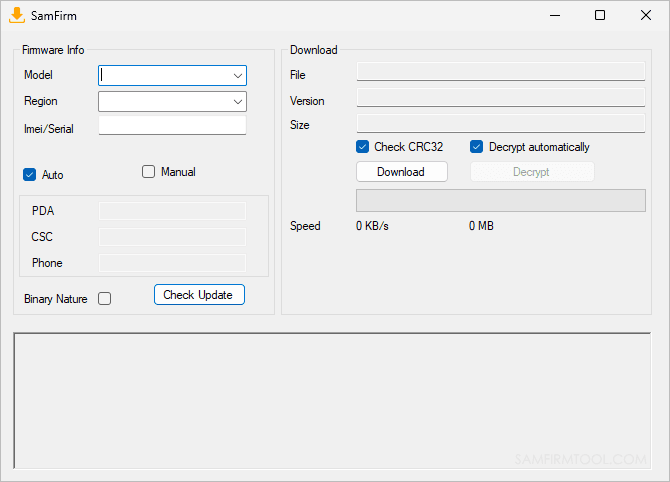
Step 1: Open SamFirm AIO v3.3. Navigate to the Firmware Download section.
Step 2: Enter your Samsung device’s model number. Find this in Settings, then About Phone, then Model Number. It will look like SM-A525F or SM-G998U for example.
Step 3: Enter your region or CSC code. Select your device region and CSC code to get the correct country-specific version so you don’t accidentally install the wrong regional firmware. If you’re unsure of your CSC code it’s typically the first three characters of your firmware version shown in Settings, About Phone, Software Information.
Step 4: Click Check Update or Search. SamFirm pulls the latest available firmware from Samsung’s servers and displays the firmware version, PDA, CSC and binary number.
Step 5: Click Download. The tool downloads the firmware directly from Samsung’s official update infrastructure. For large Samsung firmware files this can take 10 to 30 minutes depending on your connection speed.
Step 6: Once downloaded the firmware is ready to flash using Odin. Check our firmware page for Odin flashing guides.
Common Errors and Fixes
Tool won’t open or crashes immediately Windows Defender is almost certainly deleting files before you can run them. Disable Windows Defender real-time protection before extracting the archive. Also confirm you extracted from the ZIP before running rather than running directly from inside the archive. Confirm you are on Windows 8.1, 10 or 11, not Windows 7 if using v3.3 specifically.
Samsung device not detected after connecting Install Samsung USB drivers from the Drivers folder inside the extracted archive. Restart your PC after installation. Use a data cable not a charging only cable. Run the tool as administrator. Try USB 2.0 port instead of 3.0.
MTP bypass shows progress but FRP screen still appears Cold restart is essential. Hold power until fully off, wait 10 seconds, power on manually. Never auto-restart from the tool. If the screen persists try the One-Click Normal Mode method instead of MTP bypass.
Test mode code #0# doesn’t work Try #0# without the asterisk at the start. On some Samsung models the code varies slightly. If neither works your firmware version has patched this entry point. Try the MTP bypass method instead or switch to ZeroKnox Removal Tool which offers three different ADB enable approaches.
USB debugging prompt appears but disappears too fast Have someone watch the Samsung screen specifically for the USB debugging popup while you handle the tool on the PC. The prompt appears briefly and needs to be tapped within a few seconds. If you consistently miss it try connecting the device at an angle so you can see the Samsung screen while using the PC.
Firmware download pauses or shows connection errors Pause, wait a minute and resume rather than restarting from zero. Samsung’s firmware servers occasionally throttle connections. Pausing and resuming usually resolves a stalled download faster than canceling and starting over since you lose all progress when you cancel.
Firmware download completes but file is corrupted Verify the downloaded file size matches what SamFirm reported before downloading. If the file is smaller than expected the download was incomplete. Delete the partial file and start the download again. Make sure your PC isn’t going to sleep during large firmware downloads.
Knox disable not working on enterprise Samsung devices Knox disable in SamFirm AIO v3.3 works on consumer Samsung devices. For enterprise devices enrolled in Samsung Knox Mobile Enrollment the Knox restrictions are managed server-side and cannot be disabled through local tools including SamFirm AIO v3.3. Those devices need to be unenrolled through the enterprise MDM portal first.
SamFirm AIO vs Other Samsung Tools in 2026
| Tool | FRP Bypass | Firmware Download | Knox Disable | CSC Change | Android Support | Cost |
|---|---|---|---|---|---|---|
| SamFirm AIO v3.3 | Yes (MTP + Normal) | Yes (direct from Samsung) | Yes | Yes | Android 8 to 13 | Free |
| SamFw FRP Tool V5.9 | Yes (ADB + Exynos) | No | Yes | Yes | Android 8 to 16 | Free/Paid |
| ZeroKnox Removal 2.4 | Yes (3 ADB methods) | No | Yes | No | Android 8 to 16 | Free |
| Prime Tool X V9.0 | Yes (Alliance Shield) | No | No | No | Android 12 to 16 | Free |
| Z3X SamsTool Online V1.34 | Yes (all modes) | No | Yes | Yes | Android 10 to 16 | Paid yearly |
The firmware download column is where SamFirm AIO v3.3 stands completely alone. No other free Samsung FRP tool on this list downloads firmware directly from Samsung servers. If your repair workflow regularly involves both FRP bypass and firmware downloading, having SamFirm AIO v3.3 available saves you from using two separate tools for those tasks.
The Android version support column tells the honest story for FRP. SamFirm AIO v3.3 is strongest on Android 8 through 13. For Android 14 through 16 SamFw V5.9 and ZeroKnox 2.4 have better success rates.
FAQ
Is SamFirm AIO v3.3 completely free?
Yes. SamFirm AIO v3.3 by Mahmoud Salah is completely free with no credits, no activation and no account required. Both the FRP bypass functions and the firmware download function are free.
What is the difference between SamFirm AIO and SamFirm Reborn?
SamFirm AIO v3.3 is the all-in-one package by Mahmoud Salah that includes FRP bypass, firmware download, CSC change and helper tools. SamFirm Reborn 0.3.6.9 by ivanmeler is a lightweight open-source tool focused exclusively on Samsung firmware downloading with updated server protocols for 2026. Use SamFirm AIO v3.3 if you need FRP bypass. Use SamFirm Reborn if you only need firmware download.
Why is the file so large at 690MB?
The 690MB size comes from the bundled tools inside the package. Samsung USB drivers across multiple versions, Odin3 versions, helper APKs for the MTP bypass workflow, the firmware downloader and other utilities are all included. The FRP bypass tool alone is a fraction of that size.
Does SamFirm AIO v3.3 work on Android 14 and 15 Samsung devices?
Success rates drop significantly on Android 14 and 15 with recent security patches. The tool works best on Samsung devices running Android 8 through 13. For Android 14 and 15 devices SamFw FRP Tool V5.9 or ZeroKnox Removal Tool 2.4 are more reliable options.
Why does the tool require disabling Windows Defender specifically?
Windows Defender’s real-time protection scans files as they’re being extracted and flags certain tool components as suspicious due to their low-level system access capabilities. Temporarily disabling real-time protection during extraction and use prevents these false positive deletions. Re-enable after the repair is complete.
What is the MTP bypass method and why is it easier?
MTP (Media Transfer Protocol) is the same connection mode used when you plug a phone into a PC to transfer files. The MTP bypass works by exploiting this normal file transfer connection to push bypass commands to the device without needing special boot modes like Download mode or EDL mode. This makes it significantly easier than methods requiring specific button combinations to enter special device states.
Related Tools
SamFw FRP Tool V5.9 is the most reliable free Samsung FRP tool for Android 14 through 16 with Exynos support added from V5.5.1 onwards.
ZeroKnox Removal Tool handles Samsung FRP and Knox Guard removal on Android 8 through 16 with three ADB enable methods completely free.
Samsung FRP Tools is our complete comparison of every major Samsung FRP tool in 2026 with honest success rates by Android version.
OTA Firmware is where to find Samsung firmware files if you’re using SamFirm AIO v3.3 for download and need a guide on flashing with Odin.
USB Drivers has Samsung USB drivers alongside all other chipset drivers if the bundled drivers in SamFirm AIO v3.3 don’t install correctly on your system.