
SamFw FRP Tool V6.2 is the current release and the headline change is a new Exynos FRP unlock that runs straight from Download mode, covering chipsets from the Exynos 850 all the way up to the 2600. If you are still on V6.0.1 the practical question is simple: is this worth updating for, and will the new Exynos method actually work on the phone sitting on your bench. This guide answers both. It covers everything new in V6.2 and V6.1, the official download with verified MD5 checksums, an honest look at which devices the free tier still handles, and specific fixes for the errors that come up most.
All download links and checksums are in the download section below.
Disclaimer
The tools and methods shared on this page are provided for educational purposes only. Please make sure you’re using them on a device that you own or have permission to work on.
Bypassing FRP or removing a Google account from a device that isn’t yours can be illegal and may lead to serious consequences. Always follow Google’s policies and your device manufacturer’s guidelines when performing any kind of modification.
Rise ROM does not encourage or support any misuse of these tools. Use them responsibly.
What’s New in SamFw FRP Tool V6.2
SamFw FRP Tool V6.2 landed in late October 2026 and the main addition is the Exynos unlock in Download mode. Earlier Exynos handling in the tool leaned on the test mode route and an active data connection on the phone. V6.2 moves part of that workflow into Download mode, which is the same mode you use for Odin flashing, so the device talks to the tool over the Odin connection instead of relying only on the setup screen.
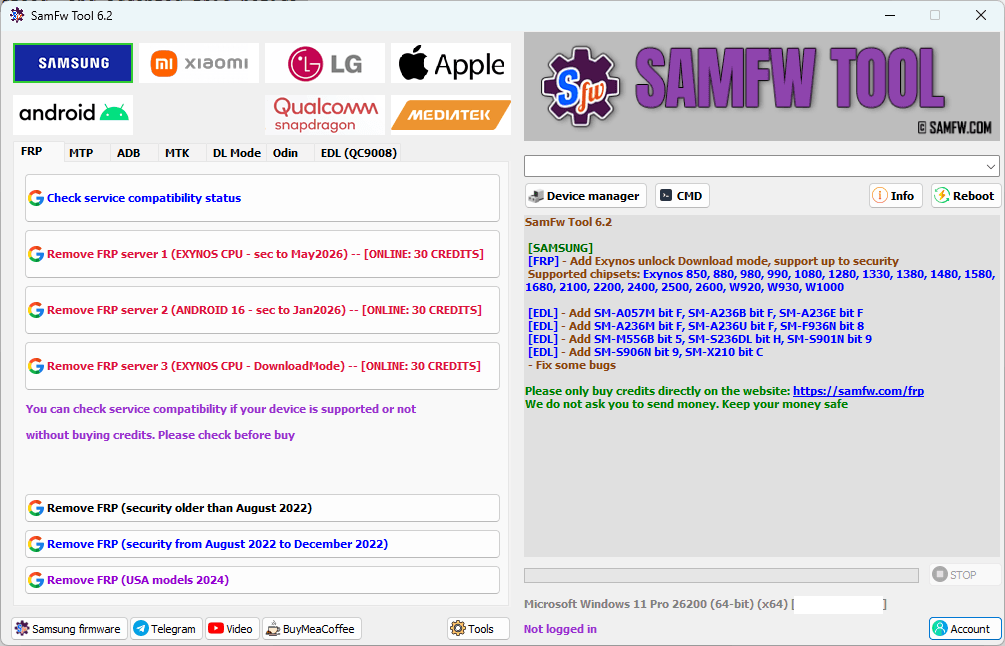
The Exynos Download mode method covers a wide chipset range. Samsung has published the supported list, and it runs across almost every Exynos part still in the field.
| Exynos series | Chipsets supported in V6.2 |
|---|---|
| Budget and mid | 850, 880, 980, 990, 1080, 1280, 1330, 1380, 1480, 1580, 1680 |
| Flagship | 2100, 2200, 2400, 2500, 2600 |
| Wearable | W920, W930, W1000 |
One honest note before you get excited. SamFw FRP Tool V6.2’s own changelog line that states how far up the security patch the Download mode unlock reaches is cut off on their page, so the exact patch ceiling is not published yet. Treat recent 2025 and 2026 patches as unconfirmed until you test on a specific model, and do not promise a customer a result on a freshly updated Exynos device until you have run it yourself.
V6.2 also expands EDL coverage with new Qualcomm entries and, per SamFw FRP Tool V6.2’s release title, ten new firehose loaders. These are the files that let the tool talk to a specific Samsung model and bit version in 9008 mode. The new EDL entries in this release cover these models.
| Model | Device |
|---|---|
| SM-A057M bit F | Galaxy A05s (LATAM) |
| SM-A236B / A236E / A236M / A236U bit F | Galaxy A23 5G variants |
| SM-S236DL bit H | Galaxy A23 (US carrier) |
| SM-F936N bit 8 | Galaxy Z Fold 4 (Korea) |
| SM-M556B bit 5 | Galaxy M55 5G |
| SM-S901N bit 9 | Galaxy S22 (Korea) |
| SM-S906N bit 9 | Galaxy S22+ (Korea) |
| SM-X210 bit C | Galaxy Tab A9+ (Wi-Fi) |
Alongside those, V6.2 lists a paid FRP method for devices the free route cannot touch, and the usual round of bug fixes.
Version History: V6.1 and V6.0.1
If you skipped V6.1, you are missing two fixes that matter.
V6.1 optimized the Exynos unlock and, more importantly, fixed an error that was triggering right after the tool took permission on the phone. That was a real failure point for people on the earlier Exynos path. V6.1 also fixed a bug tied to the FRP 2022 security change, which is the patch wall that older methods kept looping on. It added the same batch of EDL entries listed above and closed out some smaller bugs.
V6.0.1 before it added twelve firehose loaders, carried the IMEI2 and Security Patch Level readout in the MTP information panel, and introduced the basic Apple read-info functions. None of that was removed in V6.1 or V6.2, so updating forward keeps everything you already had.
Should you update from V6.0.1? Yes, and the reason is specific rather than general. V6.2 is the first build where the Exynos Download mode method exists at all, and V6.1 fixed the permission error and the FRP 2022 loop that were costing you Exynos jobs. If your work is mostly Qualcomm on older patches, the update is lower stakes, but there is no downside to being current.
Free vs Paid: What V6.2 Does Without Credits
This is the part competitors blur, so here it is plainly. The free and paid split in V6.2 is the same structure SamFw FRP Tool V6.2 has used for a while. Nothing got cheaper and nothing new became free.
The free tier works best on Samsung devices whose firmware predates December 2022. On those, the Qualcomm FRP removal runs with no account, no credits and no server authentication. That covers a large number of phones that still come through a repair counter.
Devices with a security patch from December 2022 onward need SamFw FRP Tool V6.2’s paid server. All Exynos FRP removal, including the new Download mode method, falls on the paid side. So does new EDL work. The Apple read-info functions carried over from V6.0 are free because they are diagnostics only, not an unlock.
Before you quote a customer, read the patch date. V6.0 and later show the Security Patch Level right in the MTP information panel after the phone connects, so you can tell in a few seconds whether the free route applies or whether the job needs credits.
Android Version and Security Patch Compatibility
SamFw FRP Tool V6.2 supports a very wide Android range on paper, from Android 5.0 through Android 16, but “supported” and “free” are not the same thing, and neither guarantees a result on the newest patches. Here is a realistic view.
| Android version | Typical patch range | Method | Free or paid | Realistic success |
|---|---|---|---|---|
| Android 5 to 11 | Pre-Dec 2022 | Qualcomm MTP / ADB | Free | High |
| Android 12 to 13 | Pre-Dec 2022 | Qualcomm MTP / ADB | Free | High |
| Android 12 to 14 | Dec 2022 onward | Qualcomm, paid server | Paid | Medium to high |
| Android 12 to 16 (Exynos) | Varies, ceiling unpublished | Exynos Download mode (new) | Paid | Medium, model dependent |
| Android 15 to 16, newest patches | 2025 to 2026 | Paid, where available | Paid | Low to medium, test first |
The success column is a judgement from the changelog and technician reports, not a lab figure. Treat the newest patches as the hardest, confirm on the actual model before committing, and never promise a customer 100 percent on a current flagship.
What You Need Before Starting
Windows 10 or 11 on a 64-bit PC is the stable choice. The tool still runs on Windows 7 and 8, and SamFw FRP Tool V6.2 has fixed Windows 7 issues in past releases, but driver behaviour is cleanest on 10 and 11.
The Samsung USB driver has to be installed, or detection fails before you start. You can install it from the Misc tab inside the tool, or grab it from our USB drivers page and restart the PC afterward.
Microsoft Visual C++ 2015 or newer is required specifically for the Exynos functions. The tool checks for it on launch and warns you if it is missing. Install it and the Exynos tabs behave.
You also need a proper USB data cable, not a charge-only one, and a device charged to at least 30 percent since FRP work involves mode changes and restarts. For paid operations you need a SamFw FRP Tool V6.2 account with credits, which you create free at samfw.com and top up as needed. Keep your antivirus paused or add an exclusion for the tool folder before extracting, because the executable is obfuscated to protect its code and most antivirus engines flag that as suspicious. It is a known false positive.
SamFw FRP Tool V6.2 Download
Check your Android version and device before downloading. Using the wrong file for your version is the most common reason the bypass fails.
The safest source is the official samfw.com build. Always verify the MD5 checksum before you extract anything, so you know the file was not swapped or corrupted in transit.
| File | Source | Download |
|---|---|---|
| SamFwToolSetup_v6.2.zip | Official (samfw.com) | Download |
| SamFwToolSetup_v6.2.zip | Mirror | Download |
MD5, SamFwToolSetup_v6.2.zip: 8e86f089cb48b1601ee41fb83863df06
MD5, SamFwTool.exe: 80661ebbd6e36e29e245a92bbe9108b8
To verify in PowerShell before extracting, run this and compare the result to the zip hash above:
Get-FileHash SamFwToolSetup_v6.2.zip -Algorithm MD5
If the hash matches, the download is the genuine official release. If it does not match, delete it and download again rather than running it.
How to Install and Set Up SamFw FRP Tool V6.2
Step 1: Verify the MD5 of the zip using the PowerShell command above. Only continue if it matches.
Step 2: Pause your antivirus or add the target folder to its exclusions, then extract the zip to your desktop or C drive.
Step 3: Right click SamFw FRP Tool V6.2.exe and choose Run as Administrator. Do this every time. Launching it with a normal double click causes driver and permission problems.
Step 4: Open the Misc tab and click Install Samsung USB Driver if you have not already installed it. Restart the PC after it finishes.
Step 5: If the tool warns about Visual C++ on launch, install VC++ 2015 from the same Misc tab. This is required for the Exynos functions.
Step 6: Click Login and enter your SamFw FRP Tool V6.2 account. Check your credit balance before any paid operation so a job does not stop halfway.
Step 7: Connect the Samsung over USB. After detection the MTP information panel shows the model, chipset, Android version, Security Patch Level and IMEI2, which is how you confirm whether the free or paid route applies.
Method 1: Qualcomm FRP Removal via MTP (Free Tier)
This is the free route for Qualcomm Samsung devices on patches before December 2022.
Step 1: Open SamFw FRP Tool V6.2 as administrator and confirm the phone shows in the MTP information panel with its patch level visible.
Step 2: On the locked Samsung, open the emergency dialer and type the test mode code so the service screen opens. Leave it on screen without tapping further.
Step 3: Click Enable ADB in the tool and wait for the confirmation in the log. This usually takes 10 to 30 seconds.
Step 4: Click Remove FRP and watch the progress log. It runs for one to three minutes. Do not disconnect the cable while it works.
Step 5: When the success line appears, disconnect, hold the power button until the phone shuts down fully, wait ten seconds, then power it on by hand. Finish the normal Samsung setup and the Google verification screen should be gone.
Method 2: Exynos FRP Unlock in Download Mode (New in V6.2)
This is the new paid method. It uses the Odin Download connection rather than the setup screen.
Step 1: Open the tool as administrator, log in, and confirm you have enough credits for an Exynos operation.
Step 2: Power the locked Exynos phone off, then put it into Download mode the same way you would for an Odin flash, and connect it to the PC over USB. Confirm the tool reads the Exynos chipset in the information panel.
Step 3: Open the Exynos FRP section and start the Download mode unlock.
Step 4: Let it run. Exynos operations take roughly two to five minutes and the log shows progress. The permission handling that V6.1 fixed means the stage that used to error out after taking permission now continues cleanly on most models.
Step 5: When it completes, cold restart the phone by holding power until it is fully off, then powering on manually, and finish setup. If the model sits on a very recent patch and the unlock does not take, that is the unpublished patch ceiling at work, not a tool fault.
Method 3: EDL 9008 for Supported Qualcomm Models
For the Qualcomm models with a firehose loader in V6.2, the tool can work in EDL 9008 mode for partition-level operations and FRP reset. This route involves putting the phone into 9008 mode, which on many models means a test point inside the device. Only attempt test point work if you are comfortable opening the device, since a slip here can short a board. If your exact model and bit version is not in the loader list, the tool will see the device in EDL but cannot run operations on it, and you should wait for a release that adds the loader rather than forcing it.
Errors and Fixes
Device not detected after connecting
This is almost always a driver or cable problem. Install the Samsung USB driver from the Misc tab or our drivers page, restart the PC, swap to a known data cable, run the tool as administrator, and try a USB 2.0 port instead of a 3.0 one. Clear those four before looking anywhere else.
SamFw FRP Tool V6.2 ADB enable failed
The phone did not accept the ADB handshake. Make sure the test mode screen is open and untouched on the device, that the Samsung driver is installed, and that you launched the tool as administrator. A different USB port and a cold reconnect of the phone resolve most cases. If it still fails, the model may need the Download mode route instead of the MTP one.
SamFw FRP Tool V6.2 already running
A previous instance or a stuck background process is holding the tool open. Open Task Manager, end any SamFw FRP Tool V6.2.exe process, then relaunch as administrator. If it persists, restart the PC once to clear the locked process.
Visual C++ missing or Exynos tab not working
The Exynos functions need Visual C++ 2015 or newer. Install it from the Misc tab or from Microsoft’s official download, restart the tool, and the Exynos section will load.
Antivirus deletes SamFwTool.exe on extract
The executable is obfuscated to protect its code, so engines flag it as a false positive. Pause the antivirus or add the tool folder to exclusions before extracting, then re-enable protection after you finish. Only do this with a file whose MD5 you have already verified against the hash in the download section.
Exynos unlock fails after taking permission
This exact failure was fixed in V6.1, so first confirm you are actually on V6.2 and not an older build. If you are current, check that Visual C++ is installed and the Samsung driver is up to date, and retry from a clean cold boot of the phone.
FRP removed but the verification screen still appears
Do a full cold restart. Hold power until the phone is completely off, count ten seconds, then power on by hand. Never let it auto-restart straight after the operation. If the screen survives a clean cold boot, run the removal once more.
Patch not supported, paid method required
The device is on a December 2022 or later patch, so the free Qualcomm route will not touch it and the tool is telling you so honestly. Check your credit balance and use the paid method, or move the device to a tool whose free range covers that patch.
When Not to Use V6.2
Two situations are worth a warning. The newest US carrier models and phones on the very latest 2025 to 2026 patches are the hardest targets, and SamFw FRP Tool V6.2 has not published how far the Exynos Download mode unlock reaches, so do not treat a current flagship as a sure thing. Test before you quote. And do not force EDL test point work on a model whose loader is not in the list, since pushing an operation the tool is not ready for, or mishandling a test point, is how a phone ends up soft bricked or worse.
FAQ
Is SamFw FRP Tool V6.2 completely free?
The core Qualcomm FRP removal is free on Samsung devices with security patches before December 2022, with no account or credits needed. Devices on patches from December 2022 onward, and all Exynos FRP removal including the new Download mode method, require paid server credits.
What is actually new in V6.2 compared to V6.0.1?
The main addition is the Exynos FRP unlock that runs in Download mode across chipsets from the 850 to the 2600. V6.2 also adds new EDL entries and firehose loaders. V6.1 in between fixed the Exynos permission error and the FRP 2022 bug, so updating from V6.0.1 brings all of that forward.
Does V6.2 work on Samsung Android 16?
It supports Android 16 for the operations SamFw FRP Tool V6.2 covers, but success on the newest patches depends on the exact model and build. SamFw FRP Tool V6.2 has not published the patch ceiling for the new Exynos Download mode method, so confirm on the specific device rather than assuming it will work.
Which Exynos chips does the new Download mode method cover?
Everything from the Exynos 850, 880, 980, 990, 1080, the 1280 through 1680 mid range, the 2100 through 2600 flagships, and the W920, W930 and W1000 wearable chips.
How do I verify my V6.2 download is genuine?
Run Get-FileHash SamFwToolSetup_v6.2.zip -Algorithm MD5 in PowerShell before extracting. The result should match 8e86f089cb48b1601ee41fb83863df06. If it matches, the file is the official release.
Why does the tool get flagged by my antivirus?
The executable is obfuscated to protect its source, which antivirus engines read as suspicious. It is a known false positive. Verify the MD5 first, then exclude the folder or pause protection while you extract and run it.
Related Tools
SamFw FRP Tool V6.0.1 is the previous release with the full IMEI2, Security Patch Level and Apple read-info breakdown if you want the background on what carried into V6.2.
Samsung FRP Tools is our full comparison of every major Samsung FRP tool in 2026 for when you need to pick the right one for a specific job.
Browse the complete collection on our FRP bypass tools hub, find Samsung firmware for Odin on the OTA firmware page, and get every chipset driver the tool needs from the USB drivers page.