
Honor Fastboot Tool is the go-to free solution for removing FRP lock on Honor and Huawei devices through Fastboot mode and it works completely differently from every other FRP tool covered on this site. While SamFw handles Samsung, ZeroKnox handles Knox locks and AMT Tool handles MediaTek and Qualcomm devices, Honor and Huawei use HiSilicon Kirin chipsets that none of those tools support. If you’re stuck on the Google account verification screen on a Honor or Huawei device and the standard FRP tools are doing nothing, this guide explains exactly what to use, which devices it works on, and how to do the whole process step by step.
All download links are at the bottom of this page.
⚠️ Disclaimer
The tools and methods on this page are for educational and informational purposes only. Only use them on devices you personally own or have been given explicit permission to work on. Bypassing FRP on a device you don’t own is illegal and can result in serious legal consequences. Always comply with Google’s terms of service and your device manufacturer’s policies. Rise ROM does not support any unauthorized or illegal use of the tools shared here.
Why Standard FRP Tools Don’t Work on Honor Devices
This is the section every competing guide skips and it’s the reason most people waste an hour trying tools that were never going to detect their Honor phone.
Samsung FRP tools like SamFw, ZeroKnox and Prime Tool X are built around Samsung’s specific chipset communication protocols, either Qualcomm Snapdragon or Samsung Exynos. AMT Tool and Android Multi Tools are built around MediaTek, Qualcomm and Unisoc chipsets. Every single one of these tools is chipset-specific.
Honor and Huawei devices use HiSilicon Kirin processors. These are designed and manufactured in-house by Huawei and use completely different communication protocols from Qualcomm, MediaTek or Unisoc. None of the standard Android FRP tools have drivers or protocol support for Kirin chipsets. When you plug an Honor phone into your PC and open SamFw or AMT Tool the tool simply won’t see the device because it has no way to speak the Kirin chipset’s language.
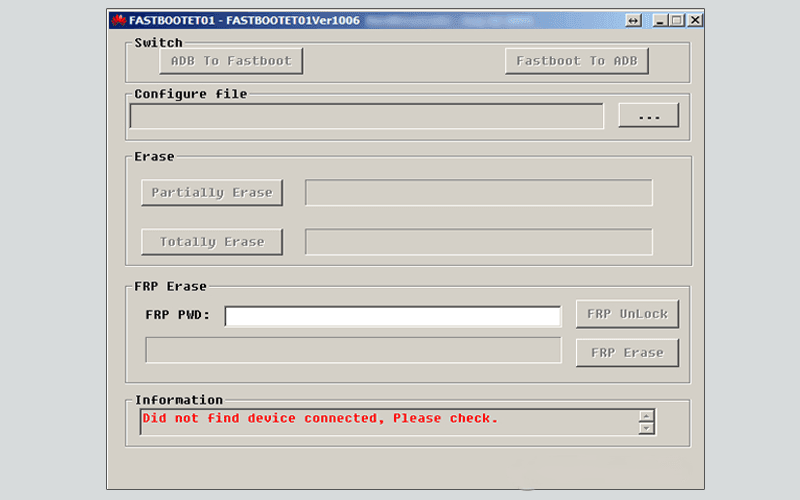
Honor Fastboot Tool and its related utilities like Huawei FastbootReader and Huawei Fastboot FRP Eraser are built specifically for Kirin based devices. They use Huawei’s own USB drivers from HiSuite to establish the connection and communicate directly with the device through Fastboot mode. This is why they work where everything else fails on Honor and Huawei.
This also means that if someone tells you to try SamFw or ZeroKnox on your Honor device, they don’t know what they’re talking about. Those tools have zero compatibility with Kirin chipsets. Honor devices need Honor specific tools.
EMUI vs MagicOS – Which Honor Devices Work With Fastboot
This is the second most important thing to understand before downloading anything and again almost no guide covers it properly.
Honor phones currently run one of two operating systems. EMUI was the original system used during the Huawei era before 2021. MagicOS is the newer system that Honor developed independently after separating from Huawei. These two systems handle FRP and Fastboot access completely differently.
You can tell the difference at boot. A colorful HONOR logo means MagicOS, while HONOR Powered by Android means EMUI.
EMUI Honor devices (Fastboot method works): You can bypass FRP on Honor Play, Honor 8X, Honor 7A, Honor Play, Honor 6X and similar models without a PC using manual tricks or with a PC using a Fastboot tool. Other EMUI devices where the Fastboot method works include Honor 8A, Honor 9, Honor 10, Honor 10 Lite, Honor 20, Honor 20 Lite, Honor View 20, Honor 9X (non-5G), and most Honor devices running EMUI 10 or earlier.
Huawei FRP Tool Fastboot is a Windows app that can remove the FRP lock from Honor devices using EMUI 10 or earlier. It can directly edit the phone’s firmware through Fastboot instead of using setup-screen tricks.
MagicOS Honor devices (Fastboot method limited): Newer Honor devices running MagicOS have significantly stronger bootloader security. Fastboot used to be a powerful way to reset or modify system partitions, but its access is now limited on many Honor devices. Most new Honor phones block Fastboot FRP methods due to security updates.
For MagicOS devices like the Honor X6, Honor X7, Honor X8, Honor 90 and newer models the Fastboot method either doesn’t work at all or requires a paid FRP key service based on the device’s serial number. We cover both scenarios separately in this guide.
Here’s the quick reference table:
| Device Era | OS | Fastboot FRP | Free Method |
|---|---|---|---|
| Honor 6X, 7A, 7C | EMUI 4 to 8 | Yes | Free, works well |
| Honor 8X, 8A, 9, 10 | EMUI 8 to 9 | Yes | Free, works well |
| Honor 10 Lite, 20, 20 Lite | EMUI 9 to 10 | Yes | Free, mostly works |
| Honor 9X (4G), View 20 | EMUI 9 to 10 | Yes | Free, mostly works |
| Honor X6, X7, X8 | MagicOS 7 | Limited | FRP key service or PC tool |
| Honor 90, 90 Lite | MagicOS 7 to 8 | Blocked | FRP key service required |
| Honor X9b, Magic5 | MagicOS 8 | Blocked | Paid service only |
What Honor Fastboot Tool Can Do
There are three main tools in the Honor Fastboot ecosystem. Each does slightly different things. Here’s the honest breakdown of all three:
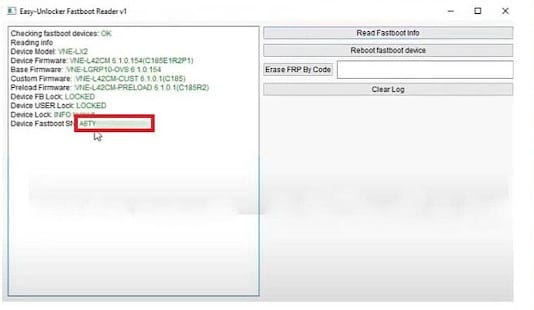
Huawei FastbootReader (Easy Unlocker Fastboot Reader) The most complete tool of the three. It helps you to erase FRP Google verification lock by enabling Fastboot mode easily. The latest updates bring new functions including remove FRP by code, read device information and enable Fastboot mode on Huawei and Honor Android phones. The process works by reading the device’s Fastboot Serial Number and then using that SN to generate or purchase an FRP erase code. Functions include Read Fastboot Info, Reboot Fastboot and Erase FRP by Code. This is the most current and actively maintained tool of the three.
Huawei Fastboot FRP Eraser A simpler one-click tool focused purely on FRP removal. It can directly edit the phone’s firmware through Fastboot instead of using setup-screen tricks. No code purchase required on supported EMUI devices. Just connect in Fastboot mode, click Erase FRP and done. Works best on older EMUI 8 and EMUI 9 Honor devices with patches before 2022.
HFT Honor Huawei FRP Tool HFT is open-source software that enables Huawei and Honor users to bypass FRP, wipe data, factory reset and format data with its BROM Mode and Fastboot Mode. It’s free to use on multiple devices including Huawei Y6 Pro, Huawei Honor 8A, Huawei Enjoy series and more. Compatible with Windows 7, 8, 10 and 11. Limitation: it has not been updated since 2023 and doesn’t work if the phone runs Android 8 or later with the latest security patch. Still useful for older devices on older patches.
Huawei FRP Tool (UnlockPrice) Developed by UnlockPrice team, it is software designed specifically for Huawei and Honor Android devices. It can not only eliminate the Google FRP lock from the device but also factory reset and reboot the device. It enables the device to enter Fastboot mode or ADB mode for further debugging. Free to download and use.
Supported Honor and Huawei Models
Here’s the most comprehensive supported model list available based on community testing and official tool documentation:\
Strong Support (EMUI, free Fastboot method works reliably):
| Model | EMUI Version | Android Version |
|---|---|---|
| Honor 6X | EMUI 4 to 5 | Android 6 to 8 |
| Honor 7A | EMUI 8 | Android 8 |
| Honor 7C | EMUI 8 | Android 8 |
| Honor 8A | EMUI 9 | Android 9 |
| Honor 8X | EMUI 8 to 9 | Android 8 to 9 |
| Honor 9 | EMUI 5 to 8 | Android 7 to 8 |
| Honor 9 Lite | EMUI 8 | Android 8 |
| Honor 10 | EMUI 8 to 9 | Android 8 to 9 |
| Honor 10 Lite | EMUI 9 | Android 9 |
| Honor 20 | EMUI 9 to 10 | Android 9 to 10 |
| Honor 20 Lite | EMUI 9 | Android 9 |
| Honor View 20 | EMUI 9 to 10 | Android 9 to 10 |
| Honor Play | EMUI 8 to 9 | Android 8 to 9 |
| Honor 9X (4G only) | EMUI 9 | Android 9 |
| Huawei Y6 Pro | EMUI 9 | Android 9 |
| Huawei Nova series (older) | EMUI 8 to 10 | Android 8 to 10 |
| Huawei P20, P20 Lite | EMUI 8 | Android 8 |
| Huawei P30, P30 Lite | EMUI 9 | Android 9 |
| Huawei Mate 20 series | EMUI 9 | Android 9 |
Limited Support (MagicOS, FRP key service required for most):
| Model | OS | Method |
|---|---|---|
| Honor X6 | MagicOS 7 | FRP key by SN |
| Honor X7 | MagicOS 7 | FRP key by SN |
| Honor X8 | MagicOS 7 | FRP key by SN |
| Honor 90 | MagicOS 7 | FRP key by SN |
| Honor 90 Lite | MagicOS 7 | FRP key by SN |
| Honor X9b | MagicOS 8 | Paid service only |
| Honor Magic5 series | MagicOS 8 | Paid service only |
What You Need Before Starting
A Windows PC running Windows 7, 8, 10 or 11. All three main tools support this range. Windows 10 or 11 recommended for best driver compatibility.
HiSuite USB drivers from Huawei’s official website. This is the single most important prerequisite and the one most guides mention too briefly. The tool requires Huawei HiSuite drivers from Huawei’s official consumer website. Standard Android USB drivers will not work. You need Huawei’s specific HiSuite drivers because they install the Huawei Diagnostics port that these tools communicate through. Download HiSuite from consumer.huawei.com and install it on your PC. Once installed the relevant USB drivers are automatically added to Windows. You don’t need to run HiSuite itself, you just need the drivers it installs.
A USB data cable that supports data transfer. Not a charging only cable. Same rule applies here as with every repair tool on this site.
WinRAR or 7-Zip on your PC. The tools come as ZIP or RAR archives.
Antivirus temporarily disabled. These tools perform system level operations and get flagged as suspicious. Disable before extracting and running.
Your Honor or Huawei device charged to at least 30%. Fastboot operations require a stable power state. A dead battery mid-process can cause issues.
For FRP key method on MagicOS devices: You will need access to the device’s Fastboot Serial Number (SN) and a paid FRP key from a service provider. The FastbootReader tool reads the SN. You then provide that SN to a service and they generate the unlock code. Costs vary by service provider but typically range from $2 to $10 USD per device.
Download Honor Fastboot Tools
All three main tools are free to download. The FRP key service for MagicOS devices has a small cost per operation.
| Tool | Best For | Download |
|---|---|---|
| Easy Unlocker FastbootReader V1 | SN reading and FRP erase by code, most current | Download |
| Huawei Fastboot FRP Eraser | One-click FRP on older EMUI devices | Download |
| HFT Honor Huawei FRP Tool | BROM and Fastboot mode, older devices | Download |
| Huawei FRP Tool (UnlockPrice) | ADB and Fastboot combined, factory reset | Download |
HiSuite drivers (required for all tools): Download from consumer.huawei.com/en/support/hisuite or from our drivers page.
How to Install and Set Up
Step 1: Install HiSuite drivers first Go to consumer.huawei.com and download HiSuite for Windows. Install it completely. You don’t need to use HiSuite itself but the installation process adds Huawei diagnostic USB drivers to Windows that all Fastboot tools depend on. Restart your PC after installation.
Step 2: Extract the tool archive Download whichever tool you’re using from the links above. Right click the ZIP or RAR file and select Extract Here. Extract to your desktop or C drive. Never run from inside the archive.
Step 3: Disable antivirus Before opening the extracted folder disable your antivirus or add the folder to exclusions.
Step 4: Run as administrator Find the main executable in the extracted folder. Right click and select Run as Administrator. For FastbootReader the executable is EasyHuaweiTool.exe. For HFT it will be the main HFT application file.
Step 5: Verify driver detection Open Device Manager on your PC. Connect your Honor or Huawei device in Fastboot mode (hold Power plus Volume Down and connect the USB cable while the phone is powered off). Look for the device appearing under Android Phone or Portable Devices. If you see it without a yellow warning icon your drivers are installed correctly.
Step by Step FRP Bypass – EMUI Devices (Fastboot Method)
This covers Honor and Huawei devices running EMUI 10 or earlier where the free Fastboot method works.
Using Huawei Fastboot FRP Eraser:
Step 1: Open Huawei Fastboot FRP Eraser as administrator on your PC.
Step 2: Power off your Honor or Huawei device completely.
Step 3: Hold Power and Volume Down simultaneously and connect the USB cable to your PC while holding both buttons. The device enters Fastboot mode. You should see a Fastboot screen or just a dark screen with some text. The tool should detect the device within a few seconds.
Step 4: In the tool confirm the device is showing as connected. Click Erase FRP or Reset FRP depending on which version of the tool you’re using.
Step 5: The tool sends the FRP erase command directly to the device’s firmware through the Fastboot connection. This takes 30 seconds to 2 minutes on most EMUI devices.
Step 6: When the tool shows a success message disconnect the USB cable. Power the device on normally by holding the Power button. The device should boot into setup without asking for the previous Google account.
Step 7: Complete normal setup and add any Google account you have access to.
Using Easy Unlocker FastbootReader (FRP by Code):
Step 1: Open EasyHuaweiTool.exe as administrator.
Step 2: Enter Fastboot mode as described above (Power plus Volume Down plus USB cable).
Step 3: Click Read Fastboot Info. The tool reads your device’s Fastboot Serial Number and displays it in the log. Copy this SN number exactly.
Step 4: Visit the FRP key service provider (IMEI-Service.com or similar trusted services) and submit the SN to purchase the FRP erase code. This costs a small fee for newer devices.
Step 5: Once you receive the FRP erase code paste it into the Erase FRP by Code field in FastbootReader and click Erase FRP.
Step 6: The tool applies the code and erases the FRP lock. Disconnect and restart the device normally.
What to Do on Newer MagicOS Honor Devices
For newer Honor devices running MagicOS where the standard Fastboot FRP erase doesn’t work, you have two realistic options:
Option 1: FRP Key by Serial Number Use FastbootReader to read the device’s Fastboot SN as described above. Submit that SN to a reputable FRP key service. This is currently the most reliable method for MagicOS Honor devices and costs a small per-device fee. Services like IMEI-Service.com provide Honor FRP reset keys based on the serial number. Once you have the key apply it through FastbootReader.
Option 2: PC Based Bypass Tools Some paid PC tools support newer MagicOS Honor devices through different bypass approaches. Tools like UltFone Android Unlock and Tenorshare 4uKey have MagicOS Honor support but both are paid. If the FRP key service doesn’t work for your specific MagicOS model these tools are worth investigating as alternatives.
Yes, Honor FRP bypass is still possible in 2026, but the method depends on your phone model, Android version, and security patch level. Newer Honor devices running MagicOS have stronger protection than older EMUI phones, so some old tricks no longer work. Still, there are working solutions for both PC and no-PC users. The key is using the right method for your specific Honor device.
Errors and Fixes
Device not detected in the tool after connecting HiSuite drivers are the most common cause. Reinstall HiSuite from consumer.huawei.com and restart your PC before trying again. Also confirm you’re entering Fastboot mode correctly. Power off completely first, then hold Power plus Volume Down and connect the USB cable while holding both. The timing matters. Check Device Manager to see if the device appears as any kind of device. If it shows with a yellow warning icon the driver is wrong or incomplete.
Fastboot mode not triggering on the device Some Honor models use a slightly different button combination. Try Volume Up plus Power instead of Volume Down plus Power. On some Honor devices you need to hold the buttons for longer before connecting the cable. Make sure the device is fully powered off and not just in sleep mode before starting the button combination.
Tool shows device connected but Erase FRP fails Your firmware patch level may be newer than what the free Fastboot method supports. Try the FRP key by code approach using FastbootReader instead of the direct erase method. The key-based approach works on a wider range of firmware versions than the direct erase.
FRP erased successfully but Google account screen still appears Power the device completely off by holding the power button for 10 seconds. Wait 10 seconds then power on manually. Don’t let the tool restart it automatically. A clean cold boot is required for the FRP change to take full effect on most Honor EMUI devices.
Tool works on an EMUI device but fails on a MagicOS device This is expected. The free Fastboot erase method works on EMUI 10 and earlier. MagicOS devices block direct Fastboot FRP modification as part of their enhanced security model. Use the FRP key by SN service for MagicOS Honor devices.
HiSuite driver installs but device still not recognized Go to Device Manager and look for any Huawei device entry with a yellow warning icon. Right click and select Update Driver. Browse manually to the HiSuite installation folder which is typically in C:\Program Files\Huawei\HiSuite\Drivers. Select the correct INF file for your connection mode. For Fastboot mode look for a driver entry specifically mentioning Fastboot or Android Bootloader Interface.
dm-verify error after FRP erase on certain Honor models This can occur on some Honor devices after a Fastboot level modification. If the device shows a warning about software integrity after restarting it may need a firmware reflash to restore the verified boot state. Check our firmware page for Honor and Huawei firmware files.
FAQ
Does Honor Fastboot Tool work on all Honor phones?
No. The free Fastboot FRP erase method works on Honor devices running EMUI 10 or earlier. Newer Honor devices running MagicOS have blocked direct Fastboot FRP modification. For MagicOS devices the FRP key by serial number service is the most reliable approach, though it involves a small cost per device.
Do I need to pay for any of these tools?
The tools themselves are free to download and use. For EMUI Honor devices the Fastboot FRP erase is completely free with no cost per operation. For MagicOS Honor devices using the FRP key by SN method there is a small per-device cost for the FRP key from a service provider, typically between $2 and $10 USD.
Why won’t Samsung or MediaTek FRP tools detect my Honor phone?
Honor and Huawei devices use HiSilicon Kirin chipsets which are completely different from Qualcomm, MediaTek, Samsung Exynos and Unisoc. Tools built for those chipsets have no drivers or protocol support for Kirin devices. Honor requires Honor-specific tools with HiSuite based drivers.
What is the difference between EMUI and MagicOS?
EMUI is the operating system Honor used during the Huawei era before 2021. MagicOS is the system Honor developed independently after the Huawei-Google separation. EMUI devices are generally easier to bypass with free tools. MagicOS devices have stronger security. At boot a colorful HONOR logo means MagicOS while HONOR Powered by Android means EMUI.
What is a Fastboot SN and why do I need it?
The Fastboot Serial Number is a unique identifier stored in your device’s firmware that is readable through Fastboot mode. For MagicOS Honor devices FRP key services use this SN to generate a device-specific unlock code. The FastbootReader tool reads this SN from your connected device so you can submit it to the key service.
Can I bypass Honor FRP without a PC?
Yes, but only on some older devices. New Honor phones often need a PC tool for successful FRP bypass. For older EMUI Honor devices some setup screen based manual tricks exist but success is limited compared to the PC Fastboot method. Newer MagicOS devices almost always need a PC-based approach.
Related Tools
If you’re working on non-Honor Android devices here are the tools that cover other brands on Rise ROM:
Samsung FRP Tools covers SamFw, ZeroKnox, Prime Tool X and HalabTech for all Samsung FRP scenarios.
FRP Bypass Without PC covers APK based no-PC methods that work on standard Android devices including some older Honor EMUI models.
FRP Bypass Motorola covers MotoReaper and APK methods for Motorola specific FRP scenarios.
USB Drivers has HiSuite based Huawei drivers alongside all other chipset drivers for every repair tool on this site.
OTA Firmware is where to find Honor and Huawei firmware files if your device needs a firmware flash alongside or instead of FRP removal.
Oppo A5 5G mobile ka lock todna hai
Ham forward kar rahe the to vahan per lock ID ho gai ab use aage badhao
Tolong bukah lok